This Plugin Will Change How You Use Craft CMS Forever
We built a free Craft CMS plugin that gives you instant access to any entry, setting, or page with just two keystrokes. It learns your workflow and works on the front-end too.

We built something that's made our lives a lot easier, and we wanted to share it with you.
Here at Brilliance, we work in Craft CMS all day, every day. And like you, we found ourselves clicking through the same menus over and over. You know the ones - navigating to that entry you edit constantly, checking those plugin settings, finding that Commerce order page.
We kept thinking there had to be a faster way. So we built one.
It's called Craft Launcher, and it lets you get anywhere in your Craft site with just a couple of keystrokes. We've been using it on all our projects, and honestly, it's changed how we work. We thought you might find it useful too.
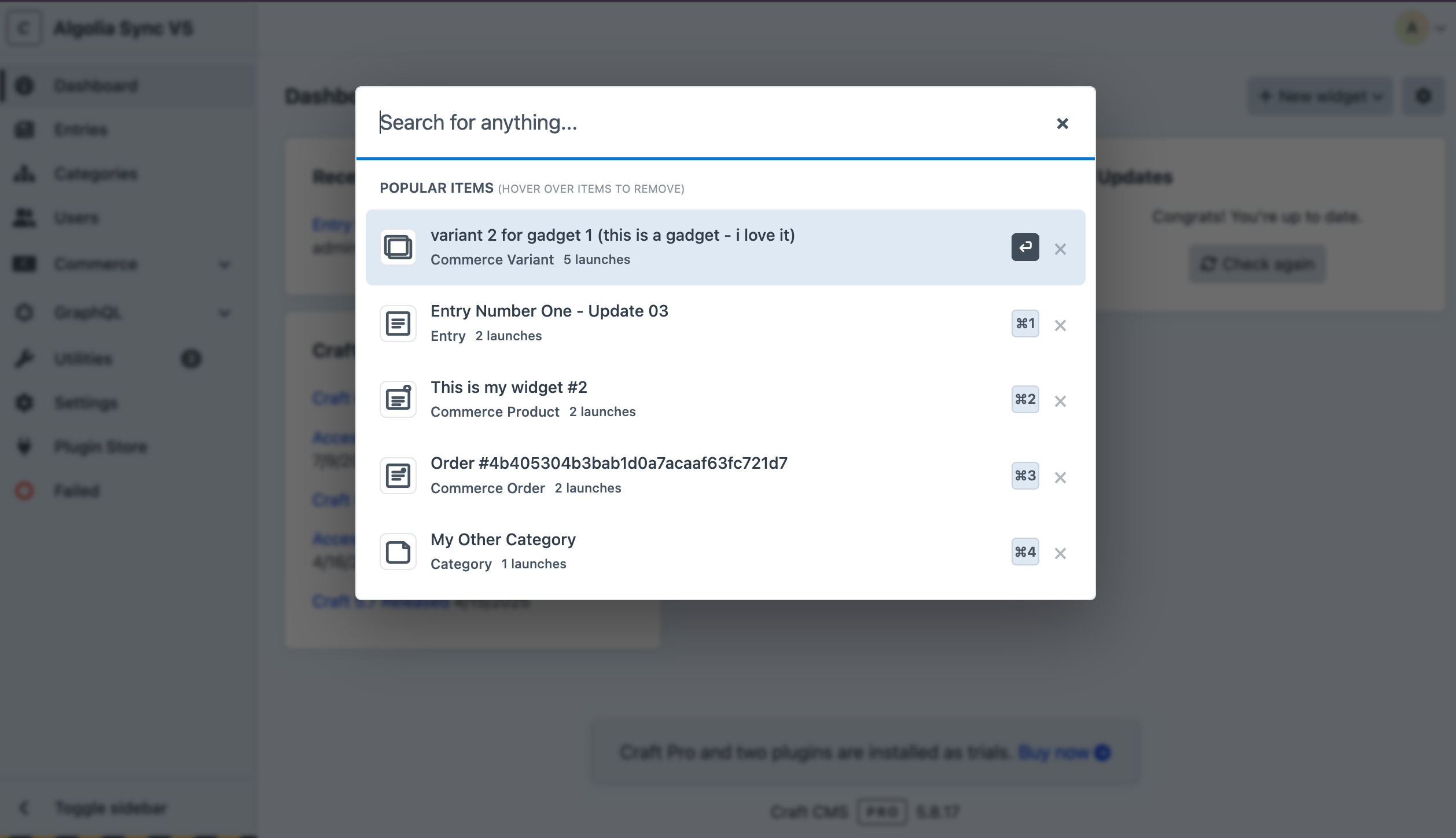
Here's How It Works
Press Cmd+K (or Ctrl+K on Windows/Linux) from anywhere in the admin panel. You'll see a search interface that gives you access to everything:
Type "home" and you'll find your homepage entry right away.
Type "email" and there's your email settings.
Type "users" and jump straight to user management.
It's pretty simple, but it eliminates so much of that daily menu navigation. Once we started using it, we realized how much time we were spending just clicking around.
(Side note: We were really honored when Craft Launcher got mentioned at Dot All 2025 in Lisbon. Thanks to the amazing Pixel & Tonic team for the shout-out!)
The Smart Part
Here's what makes it really useful: it learns your workflow.
After you use it for a bit, the launcher starts tracking what you actually navigate to (not just what you search for). So when you press Cmd+K without typing anything, your most-used items are already there waiting for you.
If you edit the homepage all the time, it'll be your first result. If you're constantly checking a certain plugin's settings, it'll surface that. It basically adapts to how you work.
For us, that meant our most common tasks went from "click, click, scroll, click" to just "press Cmd+K, hit Return." Two keystrokes instead of four clicks. It adds up over the course of a day.
One Feature We're Really Excited About
We added something that's been incredibly helpful for our team: the launcher works on the front-end too.
You can enable it in your account preferences, and then when you're browsing the live site and spot something that needs fixing, just press Cmd+K, type "edit," and you're editing that exact entry.
No need to log back into the admin panel or figure out which section it's in. Just edit it right there. Our content editors have told us this feature alone makes their day so much easier.
If You're Using Blitz
This has been a big time-saver for us. When we're working on a site with Blitz caching, the launcher shows the cache status right in the search results.
So if you need to clear the cache for a specific page, you can see its status and clear it with one click - even from the front-end. That's been really handy when clients call about something not updating. We can fix it right away without digging through settings.
Same thing with View Count - if you're using it, view statistics show up right there in your search results. One less dashboard to check.
Plugin Developers: Let's Collaborate
If you're building a Craft plugin, we'd love to help you integrate with Launcher.
We've built the integration framework to be really flexible. You can add it from your plugin's side without needing any changes from us. Show status information, display metrics, add action buttons - whatever makes sense for your plugin.
Or, if you'd prefer, we're happy to build native support for your plugin directly into Launcher. We'd love to add more useful integrations that give people quick access to the tools they use most.
The documentation has examples and code samples to get you started. And if you want to chat about ideas or need help implementing an integration, just reach out. We're here to help make it work.
What's Included
The core features:
- Search across entries, categories, assets, globals, users, and Commerce data
- Quick access to plugin settings and system configurations
- Jump to sections, entry types, and field definitions
- Browse mode (type *) to explore your entire site systematically
The helpful extras:
- Learns your workflow and shows your most-used items first
- Works on the front-end for quick edits while browsing
- Integrates with Blitz to show cache status and clear caches
- Shows View Count stats inline with search results
- Fully configurable keyboard shortcuts
Keyboard shortcuts we use all the time:
- Cmd+K or Ctrl+K - Open the launcher (close it the same way)
- Return - Go to the first result
- Cmd+1-9 - Jump directly to a numbered result
- * - Enter browse mode
- Arrow keys - Navigate through results
All the shortcuts are configurable if you prefer different keys.
Security
We use this on production sites, so security was important to us. The front-end launcher:
- Only works when you're logged in with the right permissions
- Validates permissions for every action
- Includes CSRF protection
It's convenient, but secure.
How We Use It
Different people on our team use it differently:
Our developers jump between field definitions, plugin configs, and system settings constantly. The launcher makes that so much faster than clicking through Settings menus.
Our content team loves that their most-edited entries are always right there when they open the launcher. And the front-end editing feature has become their go-to way to fix quick updates.
For Commerce sites, being able to search orders by reference number or find customers by email without navigating through menus has been a huge time-saver.
Want to Try It?
We've made Craft Launcher free and available in the Craft Plugin Store.
Installation takes about 30 seconds:
composer require brilliance/craft-launcher php craft plugin/install launcher
Then press Cmd+K and give it a try.
Requirements:
- Craft CMS 5.0 or later
- PHP 8.2 or later
Works great with:
- Blitz - Cache management right in your search results
- View Count - Content analytics displayed inline
Why We're Sharing This
We built Craft Launcher to solve our own workflow challenges. We were spending way too much time navigating through menus when we could be actually building things.
After using it ourselves for a while, we realized other Craft developers and content teams might find it just as helpful. So we're making it freely available to the community.
We believe in tools that make work easier, and we're happy to share what's been working for us.
If you want to get involved:
Give It a Try
We think you'll find it makes your daily Craft workflow quite a bit smoother. It's certainly done that for us.
Install Craft Launcher, press Cmd+K, and see if it helps speed up your day.
We'd love to hear what you think.
Thanks to the Pixel & Tonic team for building Craft CMS and for the kind mention at Dot All 2025 Lisbon. Thanks to the Craft community for the feedback and suggestions that helped shape this tool. We're grateful to be part of such a supportive community.
Continue reading.
The Element API plugin is a very powerful tool that you can use for quickly exposing your data structures to an external source.
Read more

A brief introduction to consensus mechanisms and why proof of stake is the right move for Ethereum.
Read moreLet's chat about your project
Ste 700
Portland, OR 97214